AI Writing Tools · Blog Productivity · 2026 Guide
Article at a Glance
- AI blog writing tools like Anyword and Wordform can cut your writing time in half — or down to as little as 7 minutes per post.
- Anyword’s Blog Wizard gives you a Predictive Performance Score that tells you how well your headline and intro will perform before you publish.
- Wordform AI writes, researches, and formats complete blog posts at the equivalent of 479 words per minute — and publishes directly to WordPress.
- Choosing the right tool depends on whether you prioritize speed, research depth, or data-backed performance predictions — and we break down exactly which is best for each.
- There are also free tools worth knowing about, and the best ones might surprise you.
Table of Contents
- Why Even Experienced Writers Struggle With Speed
- What AI Blog Writing Tools Actually Do
- Anyword Blog Wizard: What It Does and How It Works
- Anyword’s Predictive Performance Score
- Wordform AI: How George Writes Your Blog Post for You
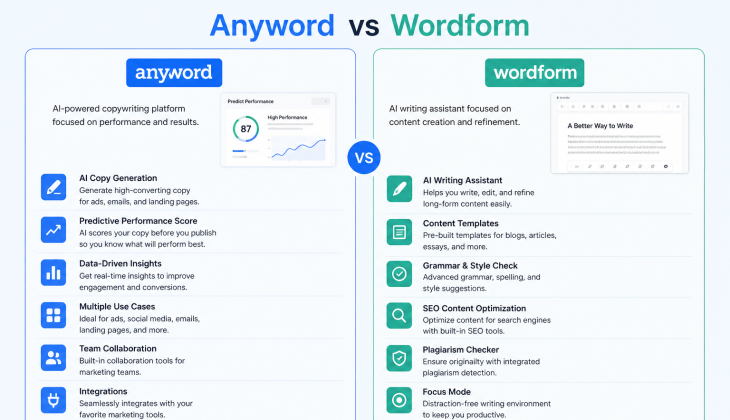
- Anyword vs Wordform: Which Tool Wins for Bloggers
- Blog Post Best Practices That Make AI Output Better
- The Best Free Tools to Write Better Blog Posts Faster
- The Verdict: Which Tool Should You Use
- How Media Strobe Can Help
- Frequently Asked Questions
Writing a great blog post doesn’t have to take hours — and the bloggers who already know that are publishing circles around everyone else. If you want to write better blog posts without spending entire afternoons on a single draft, understanding how AI writing tools transform the content creation process is the fastest path forward.
The gap between slow writers and fast ones isn’t talent. It’s process. Most writers lose time in three places: staring at a blank page, second-guessing their structure, and endlessly editing sentences that were fine to begin with. AI writing tools solve all three of those problems directly. Anyword’s Blog Wizard is one of the most refined tools in this space, built specifically to take a raw idea and turn it into a structured, high-quality post with minimal friction.
Why Even Experienced Writers Struggle With Speed
Even seasoned bloggers hit walls. The research phase bleeds into the outline phase, the outline phase bleeds into the draft, and before long two hours have passed with only 300 words to show for it. The problem isn’t the writing itself — it’s the decision fatigue that comes before the writing even starts.
Structure decisions, headline choices, section sequencing — these cognitive loads stack up fast. And every time you stop writing to reconsider a heading or rewrite an intro, you break the flow that makes writing feel effortless. For more insights on maintaining a seamless writing process, explore the new buyer journey and its impact on content creation.
What AI Blog Writing Tools Actually Do
AI blog tools don’t just autocomplete your sentences. The best ones handle the entire pre-writing phase — generating outlines, headline options, and intro paragraphs from a single brief — so you can start writing with momentum already built. They act less like a ghostwriter and more like a highly productive writing partner who does all the prep work before you sit down.
Anyword Blog Wizard: What It Does and How It Works
Anyword’s Blog Wizard is a purpose-built AI blog generator that takes you from idea to published-ready post in a structured three-step workflow. It’s not a general-purpose AI chatbot — every feature is designed specifically around blog content creation.
Step 1: Fill Out Your Blog Brief
The process starts with a short blog brief. You log into Anyword, open a new Blog Wizard project, and describe what your post is about. This doesn’t need to be detailed — even a two-sentence description gives the AI enough to work with. Anyword uses this input to generate your outline, headline options, and introduction paragraph automatically.
What makes this step powerful is that you’re not just prompting a blank AI. The Blog Wizard is trained on blog-specific content patterns, which means the output it generates at this stage already has the bones of a well-structured post — not just a wall of loosely related text. For more insights on building a strong online presence, explore our digital marketing strategies.
Step 2: Choose Your Headline and Generate Your Outline
Once your brief is submitted, Anyword generates multiple headline options alongside your outline and intro. You pick the headline that fits best, review the outline structure, and make any adjustments before moving forward. This is where the Predictive Performance Score becomes immediately useful — more on that shortly.
Step 3: Write Body Paragraphs With AI Assistance
With your outline locked in, Anyword lays out each section and lets you generate body paragraphs one at a time. You’re not handed a finished draft and told to accept it — you generate, review, and move forward section by section. This keeps you in control of the post’s direction while still moving at AI speed.
Regenerate Any Section With Custom Instructions
One of the most practical features in Anyword’s Blog Wizard is the ability to regenerate any individual element — not just the body paragraphs, but also the headline, intro, or any outline section — without starting over. If a paragraph doesn’t land the way you wanted, you can rephrase or regenerate it on the spot.
This is a major time saver compared to manually rewriting sections. Instead of editing a paragraph from scratch, you give the AI a direction tweak and get a new version in seconds. The key regeneration options include tools like Anyword’s blog post generator that enhance your writing process.
Anyword Regeneration Options
- Rephrase: Keeps the same meaning but rewrites the sentence structure and tone
- Regenerate: Produces a completely new version of the paragraph or section
- Edit headline: Swap out your selected headline for a new AI-generated option
- Adjust outline: Add, remove, or reorder sections before generating body content
- Rewrite intro: Generate a new introduction without affecting the rest of the post
This level of granular control means you’re never locked into a direction you don’t like, and you never have to throw away a full draft just because one section isn’t working. For more insights on content optimization, check out our guide on product data optimization.
Anyword’s Predictive Performance Score
Most AI writing tools tell you what to write. Anyword goes one step further and tells you how well it’s likely to perform. The Predictive Performance Score is a copy analytics feature built into Anyword’s platform that scores your headlines and introduction paragraphs based on predicted engagement — before you hit publish.
How It Scores Headlines and Introductions Before You Publish
The score is generated automatically as you build your post inside the Blog Wizard. Anyword analyzes your headline and intro against its performance data and assigns a numeric score that reflects predicted audience engagement. Higher scores correlate with stronger click-through and read-through rates. This means you’re not guessing which of your three headline options is best — the data tells you directly, so you can make a confident choice before the post is live. For more insights on enhancing audience engagement, explore organic social media strategies.
Wordform AI: How George Writes Your Blog Post for You
Wordform AI takes a different approach to blog writing. Where Anyword is a collaborative tool that walks you through a structured workflow, Wordform operates more like a fully autonomous content engine. You give it a keyword, idea, or post title — and it handles everything from there.
Wordform’s AI — branded as “George” — researches the topic, builds an outline, refines the headline, pulls in source data, writes the full article, and formats it with images. The platform claims a completion time of under 7 minutes per post, with an equivalent output speed of 479 words per minute. That’s not an editing speed — that’s full article generation from scratch.
For bloggers who want to produce a high volume of content without proportionally increasing their writing hours, Wordform positions itself as an elite-tier solution. The platform’s pitch is direct: research, write, and format complete posts in under 7 minutes, then publish them straight to WordPress with a single click.
Deep Research and Automatic Source Checking
One of Wordform’s core differentiators is its research capability. Rather than asking you to provide source material or background context, Wordform’s engine pulls in relevant data and source references as part of the article generation process. This makes it particularly well-suited for niche blogs, technical topics, or any post that needs factual grounding to be credible.
This matters more than most bloggers realize. AI-generated content without grounded research tends to produce generic posts that rank poorly and don’t build reader trust. Wordform’s automatic source integration is designed to close that gap, producing content that reads like it was researched by a subject-matter expert rather than assembled from pattern-matching. For those looking to enhance their content strategy further, exploring how to get recommended by AI platforms can be beneficial.
One-Click Outline, Draft, and Publish to WordPress
Wordform’s workflow is built around removing every friction point between idea and published post. Once you input your keyword or topic, the platform generates your topic angles, headline options, outline, and full article body without requiring manual input at each stage. The WordPress integration then lets you push the completed post directly to your site — no copy-pasting, no reformatting, no manual upload. For more insights on enhancing your content strategy, explore organic social media strategy techniques.
For bloggers managing multiple sites or trying to create a month’s worth of content in a single weekend, this end-to-end automation is the feature that changes the math entirely. What used to require a full day of writing, editing, formatting, and uploading can now happen in a single focused session.
Wordform vs. Manual Writing: A Speed Comparison
| Task | Manual Process | Wordform AI |
|---|---|---|
| Research & topic selection | 45–90 minutes | Automated |
| Outline creation | 15–30 minutes | Automated |
| Full draft writing | 60–120 minutes | Under 7 minutes total |
| Formatting & images | 20–40 minutes | Automated |
| WordPress upload | 10–20 minutes | 1-click publish |
Anyword vs Wordform: Which Tool Wins for Bloggers
Both tools are genuinely powerful, but they’re built for different types of bloggers and different content goals. The right choice depends on what slows you down the most and what kind of control you want to keep over your content. For bloggers looking to enhance their content strategy, understanding how to get recommended by AI tools can be crucial in making the right choice.
Best for Speed and Simplicity
If your primary goal is raw speed — getting from zero to a complete, published post as fast as possible — Wordform has the edge. Its fully automated pipeline handles research, writing, formatting, and publishing in a single flow. You don’t need writing experience, a structured brief, or even a detailed idea to start. A keyword is enough.
This makes Wordform the stronger choice for high-volume content strategies, affiliate blogs, or any use case where output frequency matters as much as individual post quality.
Best for Research-Heavy and Data-Backed Posts
Wordform also leads here, specifically because of its automatic source-pulling feature. If you’re writing in a technical niche, covering a topic that requires factual accuracy, or building a blog that needs to establish authority through cited information, Wordform’s research integration reduces the risk of producing thin, unsupported content. For more on establishing authority, check out this brand building strategy.
Best for Writers Who Want Performance Predictions
Anyword is the clear winner for bloggers who want data-driven decision-making baked into their writing process. The Predictive Performance Score is a unique feature that no other tool in this comparison offers, and it directly addresses one of the most common blind spots in content creation — not knowing if your headline or intro will actually connect with your audience until after you’ve published. This is similar to how product data optimization can enhance the effectiveness of e-commerce strategies.
If you’re running a blog where conversion matters — whether that’s email signups, affiliate clicks, or product sales — being able to predict headline performance before publishing is a genuine competitive advantage. Anyword also gives you more hands-on control over each section of your post, which suits writers who want AI assistance without fully handing over the wheel.
Blog Post Best Practices That Make AI Output Better
AI tools are only as good as the direction you give them. Dropping a vague keyword into any blog generator and expecting a polished, high-ranking post is like handing a skilled contractor a napkin sketch and expecting a finished house. The inputs matter — and understanding a few core blogging principles will dramatically improve the quality of whatever the AI produces for you.
Match Your Content to Search Intent
Before you write a single word — AI-assisted or not — you need to know exactly why someone is searching for your topic. Search intent is the reason behind a query, and Google is very good at detecting when your content doesn’t match it. If someone searches “how to write better blog posts,” they want actionable steps, not a history of blogging. Give your AI tool a brief that reflects the intent behind the keyword, and your output will be sharper, more relevant, and far more likely to rank.
Structure Posts for Skim Readers
The average reader doesn’t read blog posts — they scan them. They look at headings, bold text, bullet points, and the first sentence of each paragraph to decide if the content is worth their full attention. If your post is a wall of unbroken text, most readers will bounce before they hit the second paragraph. For more insights on improving your content strategy, explore cross-platform strategies that enhance engagement.
A well-structured post uses short sections, clear subheadings, and visual breaks to pull readers through the content. When you’re using AI tools like Anyword or Wordform, always review the generated outline for logical flow and make sure each heading communicates something specific — not just a vague topic label, but a clear signal of what the reader is about to learn.
Essential Blog Post Structure Elements
- Use H2s for major sections and H3s for supporting points within those sections
- Bold your key takeaways within paragraphs so skimmers absorb your most important points
- Keep intro paragraphs short — three sentences max before you deliver value
- Break up long explanations with bullet points or numbered steps wherever the content allows
- Add transition sentences between sections to maintain narrative flow and reduce bounce
One practical tip: after your AI tool generates a draft, read only the headings and the first sentence of each paragraph. If that sequence tells a coherent story on its own, your structure is solid. If it doesn’t, reorganize before you refine the prose.
The Best Free Tools to Write Better Blog Posts Faster
Not every blogger is ready to invest in a premium AI writing platform — and you don’t have to be. Several free tools can meaningfully speed up your writing process without costing anything. Google Docs with the built-in Smart Compose feature handles predictive text as you type, cutting down keystrokes on repetitive phrases. ChatGPT’s free tier can generate outlines, intro paragraphs, and section drafts from a simple prompt, making it a solid starting point for bloggers on a budget. Hemingway Editor (free browser version) is one of the best tools available for tightening up AI-generated prose — it flags passive voice, overly complex sentences, and readability issues instantly.
For SEO-focused bloggers, Google Search Console is completely free and gives you real data on which of your existing posts are getting impressions and clicks — invaluable for deciding which topics to write about next. Pair that with AnswerThePublic’s free daily searches to find the exact questions your audience is already asking, and you have a free research stack that rivals paid tools. None of these replace a dedicated AI blog generator, but used together they create a workflow that’s dramatically faster than writing without any support at all. For more insights on optimizing your blog strategy, consider exploring how to get recommended by AI tools.
The Verdict: Which Tool Should You Use
If you want the fastest possible path from keyword to published post with zero manual steps, Wordform AI is the tool to use. Its autonomous pipeline — research, outline, draft, format, and publish — operates at a speed no manual process can match, and the WordPress integration removes the last friction point between writing and going live.
If you want more control over the writing process and the added advantage of performance predictions before you publish, Anyword’s Blog Wizard is the stronger choice. Its Predictive Performance Score is genuinely unique in the space, and the section-by-section generation workflow keeps you involved without slowing you down.
For bloggers just starting out or working with a tight budget, combining free tools — ChatGPT for drafting, Hemingway Editor for clarity, and Google Search Console for topic direction — gives you a functional and fast content workflow without any upfront cost. As your output needs scale, graduating to Anyword or Wordform will multiply your capacity without multiplying your hours.
How Media Strobe Can Help
Positioning Your Blog Content for Maximum Reach and Authority
Learning to write better blog posts is only half the equation. The other half is ensuring those posts actually reach your target audience and establish your authority in your niche. Media Strobe’s MultiCast campaign solves this by distributing your content expertise across hundreds of high-authority publications in formats optimized for both human readers and AI-powered search.
For bloggers, content creators, and businesses looking to amplify their thought leadership, a MultiCast campaign creates the foundational visibility layer that makes your blog posts discoverable by the right audience. When someone searches for insights on your topic area, your expertise appears consistently across the exact channels they trust — not just on your own site.
Strategic advantages for content creators and bloggers:
- Establish authority across multiple high-trust platforms — critical for building credibility beyond your own domain
- Reach readers who are actively researching your topic but haven’t discovered your blog yet
- Build visibility through demonstration of expertise rather than self-promotion — the approach that resonates with sophisticated audiences
- Generate qualified traffic from readers already pre-sold on your expertise through third-party validation
- Support SEO efforts with high-authority backlinks distributed across credible platforms
- Create compounding visibility that works alongside your blog content strategy — not instead of it
Learn how MultiCast campaigns amplify your blog content reach and authority
Frequently Asked Questions
Whether you’re evaluating AI blog tools for the first time or comparing your current setup against newer options, these are the questions that come up most often — answered directly below. For more insights, check out this guide on how to get recommended by ChatGPT.
Quick Reference: Anyword vs Wordform vs Free Tools
Anyword Blog Wizard — Best for: Performance-driven bloggers who want data-backed headline and intro scoring, section-by-section control, and a structured AI-assisted workflow.
Wordform AI — Best for: High-volume content creators who need fully autonomous post generation, deep research integration, and one-click WordPress publishing in under 7 minutes.
Free Tool Stack — Best for: Budget-conscious bloggers who want to speed up their process without a financial commitment, using ChatGPT, Hemingway Editor, and Google Search Console together.
Can I edit the content that Anyword generates for my blog?
Yes — and this is one of Anyword’s strongest design features. Every element the Blog Wizard generates, including the headline, outline, introduction, and individual body paragraphs, can be rephrased or fully regenerated at any point. You’re never locked into a version you don’t like. The rephrase option rewrites the sentence structure while keeping the meaning, while regenerate produces an entirely new version from scratch.
Is Anyword’s Blog Wizard free to use?
Anyword offers a free trial that gives new users access to the Blog Wizard and other copy generation tools. Full access to the platform’s advanced features — including the Predictive Performance Score and unlimited generation — requires a paid plan. Pricing tiers are available on Anyword’s website, and the free trial is a practical way to test the tool before committing to a subscription.
Does Wordform AI publish directly to WordPress?
Yes. Wordform AI includes native WordPress integration as part of its publishing workflow. Once your article is generated and you’re satisfied with the output, you can push it directly to your WordPress site without manually copying, formatting, or uploading anything. The key publishing features include:
Wordform WordPress Integration Features
- Direct WordPress connection with no third-party plugin required
- Automatic formatting so your post retains its heading structure and layout on publish
- Image integration included in the generated post before it’s pushed live
- One-click publish from inside the Wordform dashboard
This feature alone eliminates a step that most bloggers underestimate. The upload, format, and image-placement process for a standard post typically takes 10 to 20 minutes — Wordform removes that entirely. For those interested in learning more about optimizing digital content, check out our guide on product data optimization for eCommerce.
For bloggers managing multiple WordPress sites, this integration scales well. You can generate and publish content across different sites from a single Wordform dashboard without switching between platforms or duplicating effort.
How long does it take Wordform AI to write a full blog post?
Wordform AI completes a full blog post — from research and outline through to formatted draft — in under 7 minutes. The platform’s content engine operates at the equivalent of 479 words per minute, which means even a 1,500-word post with sourced data and formatted sections is delivered faster than most writers can finish a single paragraph manually. For those interested in leveraging AI for content creation, understanding how to get recommended by AI platforms like ChatGPT and Google AI can be beneficial.
What is the best free AI tool for writing blog posts?
For most bloggers, ChatGPT’s free tier is the most capable free AI writing tool available right now. It can generate full outlines, write intro paragraphs, produce body sections, and suggest headlines from a simple text prompt — all without any cost. The key is giving it specific, structured prompts rather than vague requests.
Pair ChatGPT with the free browser version of Hemingway Editor to clean up the output and improve readability scores before publishing. Hemingway identifies sentences that are too complex, overuse of passive voice, and adverb-heavy phrasing — all common issues in AI-generated text.
For research and topic direction, AnswerThePublic offers free daily searches that surface the exact questions your target audience is searching for, which helps you brief ChatGPT more precisely and produce content that aligns with real search behavior.
If you’re running a WordPress blog, Google Search Console is non-negotiable — even as a free tool. It shows you which posts are already getting impressions, what queries are driving traffic, and where your click-through rates are underperforming. That data directly informs what you should write about next and how you should frame it.
None of these free tools match the speed or automation of Anyword or Wordform for serious bloggers — but as a zero-cost starting point, the combination of ChatGPT, Hemingway, AnswerThePublic, and Google Search Console gives you a content workflow that’s measurably faster and smarter than writing without any tools at all. When you’re ready to scale, Anyword’s Blog Wizard is the natural next step for bloggers who want performance-backed AI writing built into every post they publish.
Why Choose a MultiCast campaign by Media Strobe?
All MultiCast campaigns are expertly created to answer highly relevant questions about your service/product that your future customers are asking (all over the internet) before they make their purchase decision. Your MultiCast is distributed to hundreds of high authority sites IN THE EXACT WAY that Google and AI love, and in 8 formats so that your answers show up everywhere people are asking questions. The benefits of running a MultiCast campaign are increased visibility (leading to increased ranking), increased warm/hot traffic, reduced customer acquisition costs, predictable growth that can be scaled, generate more revenue with higher net profit, true control over your lead generation, and better return on paid ads.