eCommerce Strategy · AI Visibility · Google Shopping
Yes, you can get eCommerce products to show up in search, Google Shopping, and AI answers with a single optimization strategy — because 83% of ChatGPT shopping results pull directly from Google Shopping’s top 40 organic listings. One well-executed Google Merchant Center strategy simultaneously improves your visibility across Google Search, Google Shopping carousels, ChatGPT recommendations, Gemini features, and Perplexity product suggestions. The key is understanding that AI tools don’t maintain their own product databases — they surface results from Google’s Shopping Graph, so optimizing your feed, schema, and reviews once improves your visibility everywhere at the same time.
Article At A Glance
- 83% of ChatGPT shopping carousel results pull directly from Google Shopping’s top 40 organic listings — meaning your Merchant Center feed is the single most important asset you control
- Google Merchant Center, product schema, and verified customer reviews are the three core elements that determine whether your eCommerce products show up in search, Shopping tabs, and AI-generated answers
- AI tools like ChatGPT, Gemini, and Perplexity don’t maintain their own product databases — they surface results from Google Shopping, so one optimization strategy covers all of them
- Most merchants are losing visibility not because of complex algorithm issues, but because of fixable feed errors, missing schema, and no review integration
- There’s a free built-in audit tool inside Google Merchant Center that most store owners have never used — and it reveals exactly what’s blocking your eCommerce products from showing up
Table of Contents
- 83% of AI Shopping Results Pull Directly From Google Shopping
- The Three Core Elements That Control Your Product Visibility
- What Actually Drives Visibility Across Search, Google Shopping, and AI
- How to Connect Your Store to Google Merchant Center
- Product Data Quality Is Your Ranking Signal
- Write Product Pages for Humans, Not Search Engines
- Add Schema Markup to Your Product Pages
- Sync Real Reviews Into Google Merchant Center
- How to Audit Your Store’s AI Shopping Readiness for Free
- How Media Strobe Can Help
- Frequently Asked Questions
One optimization strategy is all it takes to get your eCommerce products showing up in Google Search, Google Shopping, and every major AI tool at the same time.
Most ecommerce merchants think AI shopping visibility is a separate problem that requires separate solutions — a different strategy for ChatGPT, another for Gemini, another for Perplexity. That assumption is costing them visibility and sales. Shopify’s breakdown of Google AI Shopping features is one of the most practical resources available for merchants trying to understand this shift. The reality is far simpler than most people realize.
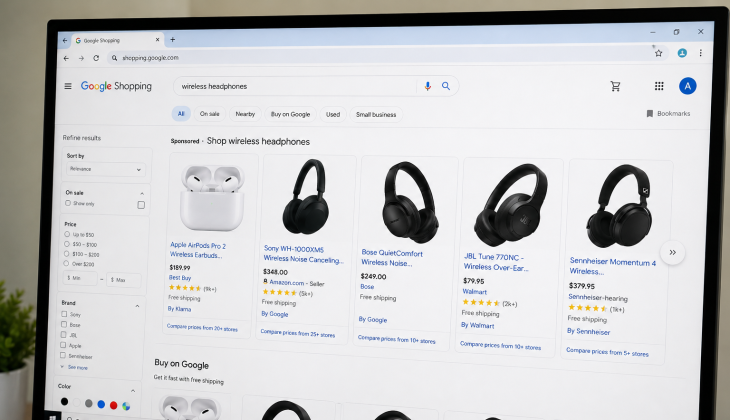
Getting your eCommerce products in front of shoppers today means showing up in three places at once: Google Search, Google Shopping, and AI-powered answer engines. The good news is that a single, well-executed core strategy covers all three.
83% of AI Shopping Results Pull Directly From Google Shopping
Critical Finding: ChatGPT Shopping Visibility
83%
of ChatGPT’s shopping carousel results come directly from Google Shopping’s top 40 organic listings (Peec AI analysis of 43,000 products, March 2026)
That single data point reframes the entire conversation about AI shopping visibility. ChatGPT is not independently crawling product pages or building its own shopping index. It is surfacing what Google Shopping already ranks. The same is true for Gemini, which is built directly on top of Google’s Shopping Graph — a database of more than 50 billion product listings processed using Google’s own Gemini AI models. Perplexity similarly references Google Shopping data for its product recommendations.
This means there is no separate optimization strategy required for individual AI platforms. Your Google Shopping ranking is your AI visibility ranking. When you improve your Merchant Center feed quality, complete your product attributes, optimize your titles, and build your review layer, you are simultaneously improving your visibility across every major AI shopping surface that exists today. For more insights, explore this AI search and eCommerce strategy guide.
Why ChatGPT, Gemini, and Perplexity Are Not Finding Products Independently
Building and maintaining a real-time product database at scale is extraordinarily resource-intensive. None of the major AI tools have done this independently — instead, they license or reference Google’s Shopping Graph because it already contains structured, verified, and regularly updated product data from millions of merchants worldwide. If your eCommerce products are not properly represented in that graph, they are effectively invisible to every AI shopping surface simultaneously. To ensure your eCommerce store is found online, it’s crucial to integrate your product data into these systems.
The Three Core Elements That Control Your Product Visibility
Three Core Systems for Product Visibility
Your Google Merchant Center feed — Controls what eCommerce products are eligible to appear and where
Your on-page product schema — Controls how search engines and AI tools read and interpret your product data
Your review layer — Controls trust signals and AI recommendation weighting
When all three are properly configured, your eCommerce products become eligible to appear in Google Shopping results, AI-generated answer carousels, and standard organic search results with rich snippets. When any one of them is broken or incomplete, your visibility takes a measurable hit across all three channels at the same time. Everything comes down to three systems working together: effective marketing strategies, optimized product listings, and efficient eCommerce multicasting techniques.
What Actually Drives Visibility Across Search, Google Shopping, and AI
The shift happening in product discovery is significant, but it is not complicated. Merchants who understand the underlying structure — that AI tools rely on Google’s Shopping infrastructure — can stop chasing platform-specific tactics and focus on what actually moves the needle.
Google Merchant Center Is the Foundation of Everything
Google Merchant Center is the direct pipeline between your eCommerce product catalog and Google’s Shopping Graph. It processes your product feed, validates your data quality, and determines whether your listings are eligible to appear across Google Shopping, Google Search, Google AI Mode, and third-party AI tools simultaneously. If your data is not properly synced here, your eCommerce products lose their primary visibility channel regardless of how well your website is built or how much ad spend you have behind them.
How Product Schema Unlocks Rich Search Results
Product schema is structured data markup added directly to your eCommerce product pages. It tells search engines — and by extension AI tools — exactly what your page contains: the product name, price, availability, brand, GTIN, and review data. Without schema, Google has to guess at this information from your page content. With schema, it reads it directly. The difference shows up as rich snippets in search results — star ratings, price ranges, and availability status displayed directly in the listing before a shopper ever clicks through.
Why Reviews Are a Visibility Signal, Not Just Social Proof
Reviews do two things simultaneously in this ecosystem. First, they feed directly into Google’s product rating system, which displays star ratings in Shopping results and rich snippets. Second, AI recommendation engines use review presence and volume as a trust and relevance signal when deciding which eCommerce products to surface. Products without verified reviews are consistently deprioritized in AI-generated recommendations. This makes review collection a technical SEO task, not just a customer service one.
How to Connect Your Store to Google Merchant Center
If you haven’t connected your eCommerce store to Google Merchant Center yet, this is your highest-leverage starting point. Getting this right unlocks visibility across Google Shopping, Google Search, Google AI Mode, and third-party AI tools simultaneously — with a single setup process.
Platform Note: The steps below use Shopify as the primary example because of its native Google integration, but the same Merchant Center setup applies to WooCommerce, BigCommerce, and Magento stores using their respective feed plugins. For a deeper dive into eCommerce strategies, you can explore this overview of eCommerce strategy.
Step 1: Create and Verify Your Google Merchant Center Account
Go to Google Merchant Center and create your account using the same Google account connected to your Google Ads and Google Analytics properties. During setup, you will verify and claim your website by adding a meta tag to your site’s <head> section or by uploading an HTML verification file to your root domain. Shopify merchants can complete this automatically through the Google & YouTube sales channel app, which handles domain verification without touching code. For more on optimizing your eCommerce presence, check out this guide on getting your eCommerce store found online.
Step 2: Sync Your Product Feed Using the Google and YouTube App
Inside Shopify, install the Google & YouTube app from the Shopify App Store. Once connected to your Merchant Center account, the app automatically generates and syncs a product feed that updates in real time as you make changes to your catalog. This feed includes product titles, descriptions, prices, availability, images, and variant data. For WooCommerce, the equivalent tool is the WooCommerce Google Listings & Ads plugin, which provides the same automated feed sync functionality.
Step 3: Fix Feed Errors Before They Kill Your Visibility
After your feed syncs, go directly to the Diagnostics tab inside Google Merchant Center. This is the free built-in audit tool that most merchants never open — and it contains a prioritized list of every error and warning currently suppressing your eCommerce product visibility. Feed errors fall into two categories: disapprovals, which remove individual products from Shopping entirely, and warnings, which reduce visibility without full removal. The most common disapproval triggers include mismatched pricing between your feed and your live product pages, missing GTINs on branded products, and policy violations on product titles or descriptions.
Product Data Quality Is Your Ranking Signal
Your Merchant Center feed is not just a technical requirement — it is the primary ranking signal Google uses to decide which eCommerce products appear and in what order. Feed quality directly determines your eligibility for Shopping placements, AI carousels, and rich snippet displays. Getting this right is not about gaming an algorithm; it is about giving Google’s systems exactly what they need to confidently surface your products to buyers who are ready to purchase.
How to Write Product Titles That Rank
Winning Product Title Formula
Structure: Brand + Product Type + Key Attribute + Size or Variant
Example: “Nike Air Zoom Pegasus 40 Men’s Running Shoe — Blue/White, Size 10”
Length: 70-150 characters to display correctly across desktop and mobile
Avoid: Vague descriptors like “premium,” “best,” or “high quality” — they add no ranking value
Product titles are the single most weighted attribute in your feed. Google reads them the same way it reads a search query — looking for relevance signals that match what a shopper typed. The formula that consistently performs is: Brand + Product Type + Key Attribute + Size or Variant. For example, instead of “Blue Running Shoe,” a properly structured title reads “Nike Air Zoom Pegasus 40 Men’s Running Shoe — Blue/White, Size 10.” Every word is doing a job.
Avoid vague descriptors like “premium,” “best,” or “high quality” in titles — these add no ranking value and can trigger policy warnings in Merchant Center. Focus on the specifics a shopper would actually type: material, size, color, model number, and compatibility where relevant. Title length should stay between 70 and 150 characters to display correctly across both desktop Shopping results and mobile AI carousels.
GTINs, Pricing Accuracy, and Real-Time Availability
GTINs — Global Trade Item Numbers, which include UPCs, EANs, and ISBNs — are mandatory for any branded eCommerce product that has one. Google uses GTINs to match your listing against its Shopping Graph product catalog, which means a missing or incorrect GTIN can prevent your eCommerce product from being associated with high-traffic search queries entirely. If your eCommerce product is custom or unbranded, set the identifier_exists attribute to FALSE in your feed to avoid disapproval. Pricing and availability must match your live website exactly — even a one-cent discrepancy between your feed and your product page triggers an automatic disapproval.
Write Product Pages for Humans, Not Search Engines
Product pages that are written for algorithms rather than shoppers now perform worse on both fronts. Google’s ranking systems — including the Gemini AI models processing its Shopping Graph — are sophisticated enough to detect keyword-stuffed, low-value content and actively deprioritize it. The pages that win are the ones that answer a buyer’s actual questions: what is it, who is it for, what problem does it solve, and why should they trust this purchase.
Why Keyword Stuffing Now Hurts AI Visibility
AI recommendation engines pull product information to synthesize answers for shoppers asking natural language questions. When your eCommerce product description is a string of disconnected keywords, the AI cannot extract a coherent, trustworthy answer from it — so it skips your product and surfaces a competitor whose page is written in clear, readable sentences. This is a direct visibility penalty that has nothing to do with traditional SEO penalties.
The shift is significant because it inverts the old approach entirely. Previously, repeating a keyword multiple times could boost a page’s relevance signal. Now, a single well-placed, naturally written sentence describing your eCommerce product’s key benefit outperforms a paragraph of forced keyword repetition — both for human readers and for the AI systems summarizing product data.
Write as if you are explaining the product to someone who has never seen it. Use the language your actual customers use when they describe or search for it. If your customer reviews consistently mention “easy to install” or “fits standard US outlets,” those exact phrases belong in your eCommerce product description — not because of keyword strategy, but because they reflect how real buyers talk about the product.
The Right Way to Structure a Product Description
Lead with the primary benefit in the first sentence. Follow with two to three sentences covering key specifications, materials, or compatibility details. Close with a practical use case or specific application that helps the shopper visualize owning the eCommerce product. Keep descriptions between 150 and 300 words for standard products. Complex or technical eCommerce products can go longer, but every sentence should add information a buyer would actually use to make a decision.
Add Schema Markup to Your Product Pages
Schema markup is the layer of structured data that transforms your eCommerce product page from a block of HTML into a machine-readable product record. Without it, Google extracts what information it can from your page — imprecisely. With it, every critical eCommerce product attribute is explicitly defined, validated, and indexed with confidence. This is what enables rich snippets, star ratings, price displays, and availability status to appear directly in search results before a shopper clicks anything. For a deeper understanding of how to get your eCommerce store found online, check out this comprehensive guide.
What Schema Fields Google and AI Tools Actually Read
Critical Schema Fields for Product Visibility
name — The exact eCommerce product title
description — Full product description matching your page content
image — High-resolution product image URL
sku — Your internal stock keeping unit
gtin8 / gtin12 / gtin13 — Barcode identifiers for branded products
brand — Manufacturer or brand name
offers — Contains price, currency, availability, and URL
aggregateRating — Average star rating and review count
Not all schema fields carry equal weight. The fields that directly impact Shopping visibility and AI recommendation eligibility are:
The offers and aggregateRating fields are the two that most directly influence whether your eCommerce product earns rich snippet treatment in Google Search results. Missing either one means your listing displays as a plain blue link while your competitors show price, availability, and star ratings in the same result position.
The Only Two Shopify Apps You Actually Need for This
Shopify’s native theme code automatically generates basic product schema, but it frequently omits GTIN fields, review aggregation data, and variant-level pricing details. The two apps that fill these gaps reliably are Yoast SEO for Shopify, which provides complete schema control including eCommerce product identifiers and breadcrumb markup, and Judge.me Product Reviews, which injects aggregateRating schema automatically as reviews are collected. Both apps are lightweight, well-maintained, and do not require developer intervention to configure correctly.
Sync Real Reviews Into Google Merchant Center
Customer reviews serve a dual function in this ecosystem that most merchants underestimate. On the surface, they build buyer confidence. Underneath, they function as a structured data feed that Google uses to generate star ratings in Shopping results, influence eCommerce product ranking within Shopping carousels, and signal to AI recommendation engines which eCommerce products have demonstrated real-world buyer satisfaction. A product with zero reviews is competing at a structural disadvantage regardless of how good its feed or schema is.
Google accepts product reviews through its Product Ratings program, which requires submitting a eCommerce product reviews feed directly to Merchant Center. Review aggregators like Judge.me, Yotpo, and Stamped.io all support direct Merchant Center feed submission, which means your reviews automatically flow into Google’s system as they are collected — without manual exports or third-party workarounds. Setting this up once creates a compounding visibility advantage as your review volume grows over time.
Why 50 Reviews Is the Minimum Threshold Worth Knowing
Star Rating Activation Threshold
50+ Reviews
Store-level minimum required before Google displays star ratings in Shopping results and rich snippets
Google’s Product Ratings program requires a minimum of 50 reviews across your entire eCommerce store before it activates star rating displays in Shopping results. This is not a per-product threshold — it is a store-level minimum. Merchants who have strong eCommerce products but have not actively solicited reviews consistently stall below this threshold for months, missing out on the click-through rate improvements that star ratings produce. The practical implication is straightforward: implement automated post-purchase review request emails on day one, not after your eCommerce store is established.
How Star Ratings Improve Click-Through Rates in Shopping Results
Once your reviews feed is active and your eCommerce store crosses the 50-review threshold, Google automatically displays star ratings alongside your eCommerce products in Shopping results and rich snippets. The click-through rate impact is measurable and consistent — listings with star ratings regularly outperform identical listings without them. This is not a minor cosmetic upgrade. It is a structural conversion advantage that compounds with every additional review your eCommerce store collects.
How to Audit Your Store’s AI Shopping Readiness for Free
Before investing time in optimization, you need an honest picture of where your eCommerce store actually stands. Most merchants assume their setup is correct because their eCommerce products appear somewhere in Google — but appearing and being fully optimized are two very different things. A eCommerce product can show up in a basic Shopping result and still be missing schema, excluded from AI carousels, and invisible to review-based ranking signals all at the same time.
The audit process does not require paid tools or outside consultants. Everything you need is either inside Google Merchant Center, Google Search Console, or freely accessible through Google’s own testing utilities. Running this check takes less than an hour and consistently surfaces high-impact fixes that most merchants have been sitting on for months without realizing it.
The Five-Point Manual Check Every Merchant Should Run
Work through each of these five checkpoints in order. Each one builds on the last, and skipping ahead produces an incomplete picture of what is actually blocking your eCommerce visibility. Start with your Merchant Center Diagnostics tab, then move outward to your product pages, schema, reviews, and content quality. Here is the full sequence:
| Checkpoint | Where to Check | What You Are Looking For |
|---|---|---|
| 1. Feed Health | Google Merchant Center → Diagnostics | Disapproved products, missing GTINs, price mismatches |
| 2. Schema Completeness | Google Rich Results Test (search.google.com/test/rich-results) | Missing offers, aggregateRating, or GTIN fields |
| 3. Review Feed Status | Merchant Center → Products → Reviews | Active feed connection, review count above 50 |
| 4. Product Description Quality | Manual review of your top 10 products | Natural language, benefit-led copy, no keyword stuffing |
| 5. AI Visibility Scoring | ChatGPT, Google AI Mode, and Perplexity — search your category | Whether your brand or eCommerce products appear in AI-generated results |
Checkpoints 1 through 3 are technical fixes with direct, measurable outcomes. Checkpoints 4 and 5 are qualitative assessments that tell you whether your content strategy is working at the AI recommendation layer — the part most merchants ignore entirely until they notice competitors showing up in ChatGPT answers and they are not. Run this audit on a monthly basis once your initial setup is complete. Feed errors reappear as you add new eCommerce products, schema plugins occasionally break after theme updates, and review feed connections can silently disconnect after platform updates without triggering any visible alert inside your eCommerce store. For a deeper understanding of improving your eCommerce strategy, explore how AI and search can drive free traffic.
The Built-In Audit Tool Most Shopify Merchants Have Never Used
Inside Google Merchant Center, under the Products tab, there is a section called Needs Attention that functions as a live, prioritized audit dashboard. It categorizes every eCommerce product issue by severity — critical errors that cause immediate disapproval, and warnings that reduce visibility without full removal. Most merchants open Merchant Center only to check if their feed is connected, never drilling into this section. The result is a slow, invisible erosion of eCommerce product visibility as unaddressed warnings accumulate over time. For more on improving eCommerce strategies and visibility, consider exploring different tactics.
For Shopify merchants specifically, the Google & YouTube app also surfaces a simplified version of feed health inside the Shopify admin under Sales Channels → Google. It flags sync errors, disapproved eCommerce products, and missing required attributes in plain language without requiring you to navigate the full Merchant Center interface. Check both locations — they occasionally surface different issues, and the Shopify-side view is faster to act on for catalog-level problems like missing product types or incomplete variant data.
How Media Strobe Can Help
Getting your eCommerce products to show up in search, Google Shopping, and AI answers requires more than just technical setup — it requires a content strategy that ensures your products are discoverable across all these channels simultaneously. Media Strobe’s MultiCast campaigns solve this exact problem by creating expert-level product content that answers the questions your target audience is asking on Google, ChatGPT, Gemini, and Perplexity before they make a purchase decision.
Media Strobe’s MultiCast Campaign:
Every MultiCast campaign transforms your product information into 8 different content formats — detailed product guides, comparison articles, educational content, video scripts, social media posts, press releases, and more — then distributes them across 300+ high-authority platforms including Google News sites, MSN, FOX affiliates, Apple Podcasts, Spotify, YouTube, industry blogs, and eCommerce publications.
This cross-platform presence creates the organic authority and warm audience pools that make your eCommerce products rank higher in Google Shopping and appear more frequently in AI shopping recommendations. When prospects see your eCommerce products mentioned on trusted third-party sites before encountering your Google Shopping listings or ads, they’re significantly more likely to convert.
How MultiCast Campaigns Improve eCommerce Visibility
- Increased visibility: Your eCommerce products appear across 300+ platforms, improving brand recall when prospects search
- Warm traffic generation: Third-party mentions create pre-qualified audiences ready to convert
- Reduced customer acquisition costs: Organic credibility lowers resistance to your shopping listings
- Better return on paid ads: Shopping campaigns perform better when organic foundation exists
- Predictable growth: Content compounds over time while eCommerce visibility scales
- True control over lead generation: Your eCommerce products show up where customers are already searching
Frequently Asked Questions
These are the questions that come up most often when merchants start optimizing for Google Shopping and AI visibility — answered directly with what actually matters in practice.
Do I Need a Custom Integration to Connect Shopify to Google AI Shopping?
No. Shopify’s native Google & YouTube app handles the full connection between your eCommerce store and Google Merchant Center, including eCommerce product feed sync, real-time inventory updates, and eligibility for Google Shopping, AI Mode, and Performance Max campaigns. There is no custom API work or developer involvement required for the standard eCommerce setup.
Custom integrations only become relevant if you have a highly complex eCommerce catalog structure — such as thousands of SKUs with non-standard variant configurations, or a headless Shopify build where the standard app cannot read your eCommerce product data correctly. For the vast majority of Shopify merchants, the native app is sufficient and is the recommended starting point.
How Long Does It Take for Products to Show Up in Google Shopping After Setup?
After submitting your eCommerce product feed to Google Merchant Center, initial review typically takes between 3 and 5 business days for standard eCommerce product catalogs. New Merchant Center accounts with no prior history may take up to 10 business days as Google verifies your business, website, and eCommerce product data quality. Once approved, eCommerce product listings begin appearing in Shopping results within 24 to 48 hours of the review completing. Feed updates — such as price or availability changes — typically propagate within a few hours for eCommerce stores using real-time feed sync through the Google & YouTube app.
Will Optimizing for Google Shopping Also Help My Products Appear in ChatGPT Answers?
Yes — directly. According to Peec AI’s analysis of 43,000 eCommerce products, 83% of ChatGPT’s shopping carousel results pull from Google Shopping’s top 40 organic listings. Improving your Merchant Center feed quality, eCommerce product schema, and review volume improves your Google Shopping ranking, which simultaneously improves your probability of appearing in ChatGPT shopping carousels, Gemini shopping features, and Perplexity eCommerce product recommendations. There is no separate ChatGPT optimization process required.
What Is the Most Common Reason Products Get Disapproved in Google Merchant Center?
Top Cause of Product Disapproval
Price or Availability Mismatch: The most frequent disapproval trigger. Google crawls your eCommerce website independently to verify that the data in your feed matches what shoppers actually see — and any discrepancy, including a price difference of even one cent, results in an automatic disapproval of that eCommerce product listing.
Second Most Common: Missing or incorrect GTINs on branded eCommerce products. Always include GTINs for any product that has one, and use the identifier_exists: FALSE attribute only for genuinely custom or private-label eCommerce products with no manufacturer barcode.
Does This Strategy Work for WooCommerce, Magento, and BigCommerce, or Just Shopify?
eCommerce Platform Compatibility
WooCommerce: Use WooCommerce Google Listings & Ads plugin for Merchant Center connection. Yoast SEO or Rank Math for schema. Judge.me for review integration.
BigCommerce: Native Google Shopping integration through Channel Manager. BigCommerce SEO settings for basic schema. Schema App for advanced control.
Magento (Adobe Commerce): Google Shopping Feed extension by Mageplaza. Schema markup typically requires extension or developer customization. Magento’s native schema output is less complete than Shopify/WooCommerce.
This strategy works across all major eCommerce platforms. The core process — connecting to Google Merchant Center, submitting a product feed, implementing eCommerce product schema, and syncing reviews — is platform-agnostic. The specific tools used to execute each step vary by platform.
In today’s digital landscape, getting your eCommerce products to show up in search results is crucial for success. By leveraging the power of AI and understanding the intricacies of search algorithms, eCommerce businesses can enhance their online visibility. For a comprehensive strategy on how to get your eCommerce store found online, it’s important to integrate effective SEO practices and stay updated with the latest trends.
Why Choose a MultiCast Campaign by Media Strobe?
All MultiCast campaigns are expertly created to answer highly relevant questions about your eCommerce service or product that your future customers are asking (all over the internet) before they make their purchase decision. Your MultiCast is distributed to hundreds of high authority sites IN THE EXACT WAY that Google and AI love, and in 8 formats so that your eCommerce answers show up everywhere people are asking questions. The benefits of running a MultiCast campaign are:
- • Increased visibility (leading to increased ranking)
- • Increased warm/hot traffic
- • Reduced customer acquisition costs
- • Predictable growth that can be scaled
- • Generate more revenue with higher net profit
- • True control over your lead generation
- • Better return on paid ads
Learn more about how MultiCast campaigns can get your eCommerce products to show up everywhere →